想定するノイズは、バッファアンダーランのようなノイズ。 検証対象としてはノイズ検出しやすそうな穏やかな曲調のカノン。以下からダウンロード。
以下のスクリプトで、バッファアンダーランを想定して一部バッファを削除してノイズを想定した音源を作成。
import numpy as np
import librosa
import soundfile as sf
import random

def inject_audio_dropouts(input_path, output_path, num_dropouts=5, dropout_ms=50, dropout_interval_ms=500, random_drop=False, remove=False):
    y, sr = librosa.load(input_path, sr=None, mono=True)
    samples_per_drop = int(sr * (dropout_ms / 1000.0))
    print(f"Loaded audio file: {input_path} with sample rate: {sr} Hz samples_per_drop: {samples_per_drop}")
    if random_drop:
        for i in range(num_dropouts):
            start = random.randint(0, len(y) - samples_per_drop)
            if remove:
                # サンプル削除(欠落)
                y = np.concatenate([y[:start], y[start+samples_per_drop:]])
            else:
                # 無音化
                y[start:start+samples_per_drop] = 0
            print(f"\rDropout {i+1}/{num_dropouts} at sample {start}", end='')
    else:
        for i in range(num_dropouts):
            start = i * int(sr * (dropout_interval_ms / 1000.0))
            if start + samples_per_drop > len(y):
                break
            if remove:
                # サンプル削除(欠落)
                y = np.concatenate([y[:start], y[start+samples_per_drop:]])
            else:
                # 無音化
                y[start:start+samples_per_drop] = 0
            print(f"\rDropout {i+1}/{num_dropouts} at sample {start}", end='')

    sf.write(output_path, y, sr)

# 使用例
inject_audio_dropouts("Canon.wav", "Canon_with_dropouts.wav", num_dropouts=10000, dropout_ms=40, dropout_interval_ms=200, random_drop=False, remove=True)
ノイズ検出は以下のコードで行う。スペクトル変化量でノイズ検出する。
import librosa
import numpy as np
import plotly.graph_objects as go
import os

def detect_noise_offline(
    input_file,
    spectral_threshold=0.02,
    frame_length=1024,
    hop_length=512
):
    """
    WAV/音声ファイルを読み込み、スペクトル変化量でノイズ検出し、
    PlotlyでHTMLグラフを保存する。

    Parameters
    ----------
    input_file : str
        入力音声ファイル(wavなど)
    spectral_threshold : float
        スペクトル変化量の絶対値閾値
    frame_length : int
        STFTのフレーム長
    hop_length : int
        STFTのホップ長
    """

    # ==== 音声読み込み ====
    y, sr = librosa.load(input_file, sr=None, mono=True)

    # ==== STFT ====
    S = np.abs(librosa.stft(y, n_fft=frame_length, hop_length=hop_length))

    # ==== フレーム間のスペクトル差分 ====
    diffs = []
    for i in range(1, S.shape[1]):
        diff_val = np.mean(np.abs(S[:, i] - S[:, i - 1]))
        diffs.append(diff_val)

    times = librosa.frames_to_time(np.arange(1, S.shape[1]), sr=sr, hop_length=hop_length)

    # ==== ノイズ検出 ====
    detections = [t for t, d in zip(times, diffs) if d > spectral_threshold]

    # ==== Plotly グラフ作成 ====
    fig = go.Figure()

    # スペクトル変化量
    fig.add_trace(go.Scatter(
        x=times,
        y=diffs,
        mode='lines',
        name='Spectral Change'
    ))

    # 閾値線
    fig.add_trace(go.Scatter(
        x=[times[0], times[-1]],
        y=[spectral_threshold, spectral_threshold],
        mode='lines',
        line=dict(color='red', dash='dash'),
        name='Threshold'
    ))

    # 検出ポイント
    fig.add_trace(go.Scatter(
        x=detections,
        y=[spectral_threshold] * len(detections),
        mode='markers',
        marker=dict(color='orange', size=8, symbol='x'),
        name='Detected Noise'
    ))

    fig.update_layout(
        title=f"Spectral Change and Noise Detection - {os.path.basename(input_file)}",
        xaxis_title="Time (s)",
        yaxis_title="Spectral Difference (abs)",
        template="plotly_white"
    )

    # ==== HTML保存 ====
    output_html = os.path.splitext(input_file)[0] + ".html"
    fig.write_html(output_html)

    # ==== ログ出力 ====
    for det_time in detections:
        print(f"Detect! {det_time:.3f}s")

    print(f"✅ グラフを保存しました: {output_html}")

    return detections


# ==== 使用例 ====
# detect_noise_offline("Canon.wav", spectral_threshold=0.02)
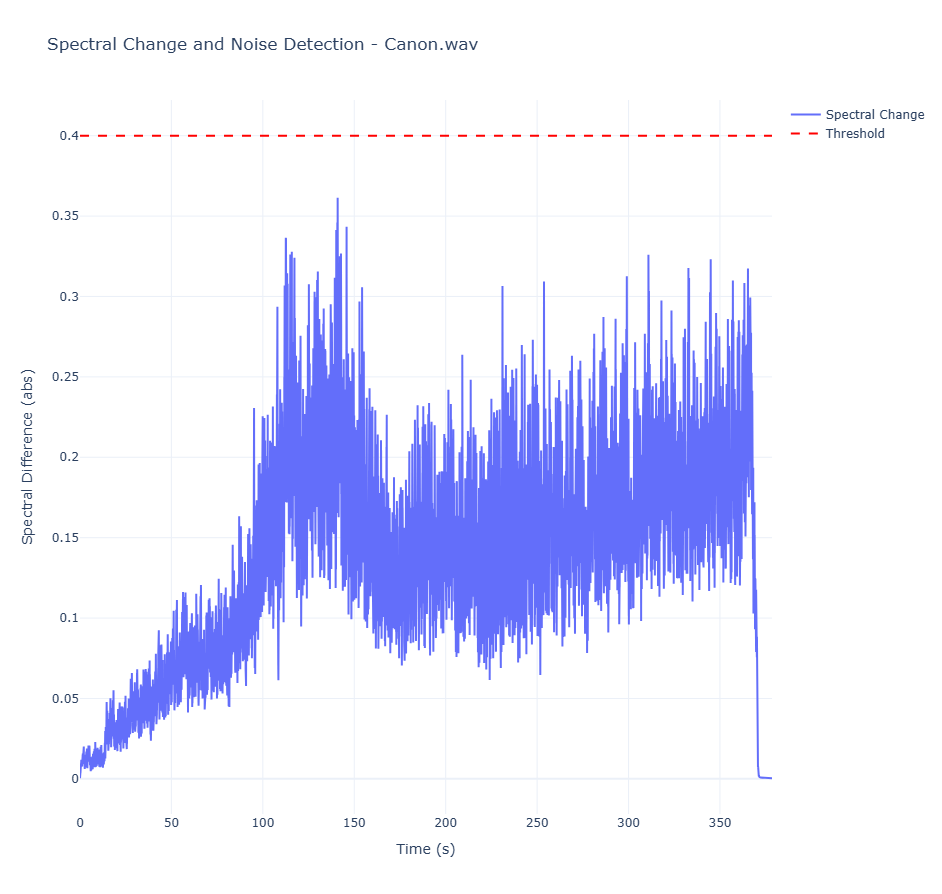
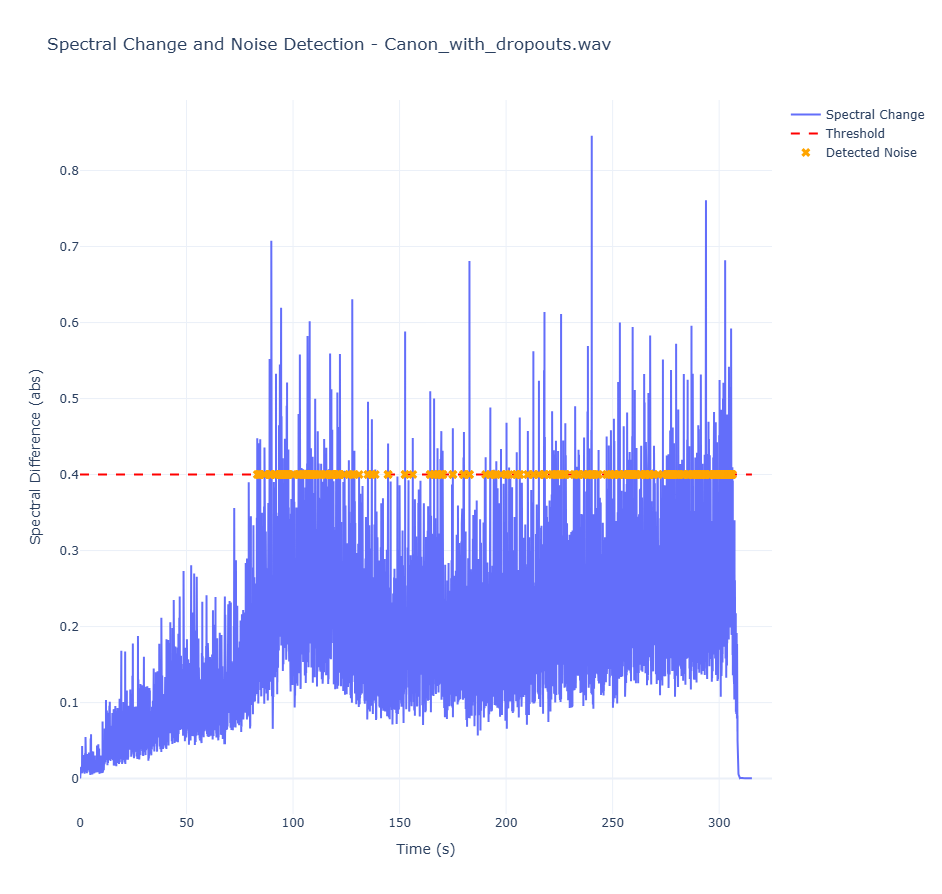
ノイズ有無でのグラフの比較は以下のとおり。ノイズありのほうが値が大きくなっており、0.4あたりを閾値にすればノイズ検出できそう。
リアルタイムで検出する場合は以下。
import sounddevice as sd
import numpy as np
import librosa
import time
import sys

# ==== 設定 ====
DEVICE_ID = 1       # Noneでデフォルトマイク, またはデバイス番号
FRAME_DURATION = 0.05  # 秒
SPECTRAL_THRESHOLD = 0.13  # ← 絶対値で設定(例: 0.02)
FRAME_LENGTH = 1024
HOP_LENGTH = 512

prev_spec = None

def audio_callback(indata, frames, time_info, status):
    global prev_spec

    if status:
        print(status, file=sys.stderr)

    # モノラル化
    y = indata[:, 0]

    # STFT
    S = np.abs(librosa.stft(y, n_fft=FRAME_LENGTH, hop_length=HOP_LENGTH))

    if prev_spec is not None:
        diff = np.mean(np.abs(S - prev_spec))

        # バー表示
        bar = "#" * int(diff * 100)
        sys.stdout.write(f"\r[{bar:<50}] {diff:.4f}")
        sys.stdout.flush()

        # 閾値判定(絶対値)
        if diff > SPECTRAL_THRESHOLD:
            print(f"\nDetect! {time.strftime('%H:%M:%S')} diff={diff:.4f}")

    prev_spec = S

def main():
    print(f"録音開始 (閾値={SPECTRAL_THRESHOLD}, Ctrl+Cで終了)")
    with sd.InputStream(
        device=DEVICE_ID,
        channels=1,
        callback=audio_callback,
        samplerate=44100,
        blocksize=int(44100 * FRAME_DURATION)
    ):
        while True:
            time.sleep(0.1)

if __name__ == "__main__":
    try:
        main()
    except KeyboardInterrupt:
        print("\n終了")
